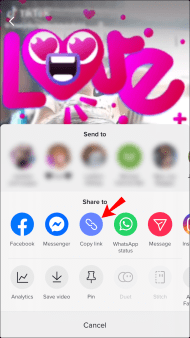
Search for the video you'd like to download from TikTok then copy the URL from your browser's address bar or the share menu.
02
Paste your URL into QuickTikSnap
Go to QuickTikSnap.online and paste the video link into the input field at the top of the page. Then click the Download button.
03
Download and save your File
QuickTikSnap will display all available formats for download. Select the quality you want and save it in MP4 or MP3 format directly to your device.
Frequently Asked Questions
Open the TikTok app on your phone or web browser. Choose the video you want to download. Click the Share button at the right bottom and select Copy Link. Go back to QuickTikSnap.online, paste your link into the field above, and click Download. Wait for our server to process the video and then save it to your device. No software installation is required!
Open your TikTok application, choose the video you want, and click Share. In the options, find the Copy Link button. Your download URL is now ready on your clipboard. For example, the link may look like: https://www.tiktok.com/@user/video/6805...
When you're downloading files, they are usually saved into whatever folder you have set as your default in your browser. In your browser settings, you can manually change and choose the destination folder for your downloaded TikTok videos.
No, QuickTikSnap does not store videos or keep copies of downloaded content. All videos are hosted on TikTok's servers. Additionally, we do not keep track of the download histories of our users, making using QuickTikSnap.online totally anonymous and secure.
No, you don't need to install anything. We try to keep things easy for our users. All you need is your TikTok download links. That's it.
Yes, our service is 100% free and will always be. We only place a few ads to maintain our servers and keep the service running for everyone.
Yes, it's better to use QuickTikSnap to save TikTok videos without watermark on your Android phone. QuickTikSnap is super fast, 100% free, and updated frequently to ensure the best experience.
Due to Apple's security policy, you usually cannot download videos to your iPhone gallery like Android. However, for iOS 13 and higher, you can use the Safari browser to download directly. For older versions, you can download the "Documents by Readdle" app from the App Store, use its built-in browser to visit QuickTikSnap, and download your videos there.
No, you don't have to pay for anything, because our software is always free. You can support us by turning off your AdBlocks or making a donation. It supports our further development.
Of course. QuickTikSnap is a web-based tool. Whether you use Windows, Mac OS, or Linux, you can use our TikTok downloader in any modern browser like Chrome, Firefox, or Edge to save videos in high quality.
It is legal to download videos for personal use and offline viewing. However, we do not encourage re-uploading or using the content for commercial purposes without the original creator's permission. Always respect the intellectual property of others.
QuickTikSnap allows you to download TikToks in the best possible quality available, which is usually HD (High Definition) in MP4 format. Our tool extracts the direct source link so you get the exact original quality without any compression loss.
No, you do not need to register, create an account, or provide any personal information. QuickTikSnap is designed to be a "plug-and-play" tool. We believe in providing a fast service that respects your privacy—just paste your link and download immediately.
Supports The Most Popular Sources
You can convert and download videos and music in MP4 or MP3 formats from these social networks.
QuickTikSnap is a project founded by Alex Kimani. We provide high-quality media tools for the global community. Our mission is to provide the cleanest, fastest, and most private way to save your favorite memories.