Fetching Video Data...

Download Options
How To Download Videos Online?

Copy the Video URL link
Search for the video you'd like to download from TikTok then copy the URL from your browser's address bar or the share menu.
Paste your URL into QuickTikSnap
Go to QuickTikSnap.online and paste the video link into the input field at the top of the page. Then click the Download button.
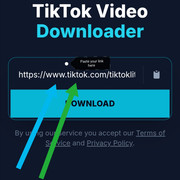
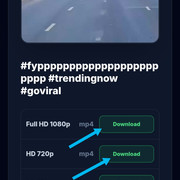
Download and save your File
QuickTikSnap will display all available formats for download. Select the quality you want and save it in MP4 or MP3 format directly to your device.
Frequently Asked Questions
Can I download Snapchat Spotlight videos?
Will the creator be notified if I download their video?
Does it work for Snapchat Stories?
Can I download Snapchat images or just videos?
Is there a limit on how many Snaps I can save?
Does the download include a watermark?
What is the best format for Snapchat downloads?
Do I need to install an app or extension?
Why did my Snapchat download fail?
Where are my Snaps saved after downloading?
Is QuickTikSnap safe and private?
Can I download Snapchat content on an iPhone?
Supports The Most Popular Sources
You can convert and download videos and music in MP4 or MP3 formats from these social networks.







Alex Kimani (Avatech)
QuickTikSnap is a project founded by Alex Kimani. We provide high-quality media tools for the global community. Our mission is to provide the cleanest, fastest, and most private way to save your favorite memories.
Follow us on FacebookNote: QuickTikSnap is not a product/tool of TikTok. We have no relationship with TikTok or ByteDance Ltd.